
MANUALS · EXTERIOR [51] · страница 28 из 54 · Открыть оригинал PDF ↗
Текст распознан со скана. Числа и обозначения можно сверить с оригиналом ниже.

<Vehicles built from November, 1993
Remove the column cover lower
With SRS>
Remove the column cover upper.
Loosen the screws indicated by arrows in the illustration,
and then remove the rear wiper and washer switches_
(4) Operate theswitch,andcheckthe continuitybetween
the terminals_
Таблица в оригинале
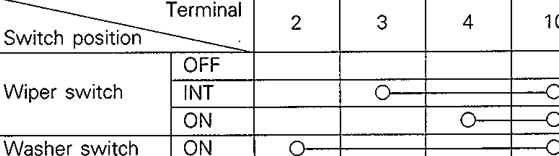
Распознанный текст таблицы — требует сверки с оригиналом
| Switch position | Terminal | 10 |
|---|---|---|
| OFF | ||
| Wiper switch | INT | |
| ON | ||
| Washer switch | ON |
NOTE
indicates thatthereiscontinuitybetweentheter-
minals

WIPER MOTOR
Check the wipermotor afterfirst disconnecting the wiring
harness connector,andwith thewipermotor remaining in-
stalled to the body.
Operation of Wiper Motor
Connectbattery tothewipermotor as shown inthe il-
lustration and inspect the motor operation.

Operation of Wiper Motor at Stop Position
(1)Run thewiper motor, disconnect the battery, and stop
the motor;
(2) Reconnect the battery as shown in the illustration, and
confirmthat afterthemotorstarts turning, it stops as
the automatic stop position
Оригинальная страница руководства
